Monday, January 5, 2015

Elementary OS


Another open source Operating System Elementary OS seems promising, it is Ubuntu based with its own shell Pantheon. The project was started back in 2011 with the first version the Jupiter then Luna in 2013 and now they have Freya which is in the first Beta from August 2014.
It is available in different common method and can found in both 32 and 64 bit platforms. It has a dock at the bottom screen as in Mac OS for the common applications.
On installation the Elementary OS is bundled with;
  • Midori as the official browser.
  • Empathy Instant Messaging Client,
  • Shotwell for image view and manipulation
  • Geary Email client, and
  • Other essential applications like; calculator, document viewer for pdf, music and video player and screenshots application.
Elementary OS just like any other UNIX distributions pre-loads the essential drivers at installation. This saves the hustle of having to find the drivers after installation. 
It is worth to note that Office application are not installed during installation and one  can use the software center application to find and install the required office application. This will also give a whole bunch of applications which the user may require at any given time.

SCREENSHOTS.

Elementary OS desktop showing the Dock


Elementary Application Launch Pad


Elementary OS Software center.
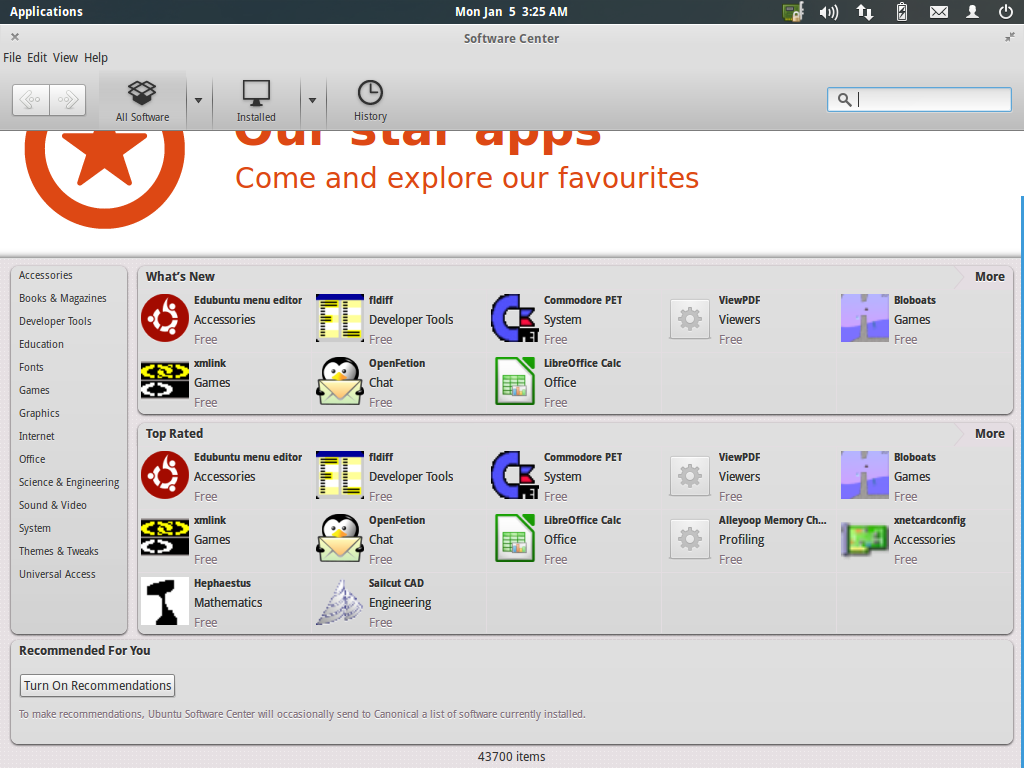


These Screenshots are taken from the 2013 Luna version. Stick around for the review of the stable Freya version review 

Cheers.

Friday, January 2, 2015

Consider Open source this year


You dont have to pay for software, there is Open Source

Over the period of technological advancement in the developing countries, big tech companies have taken this chance to harvest profits from the markets. It is eveident that Big technlogy companies usually make bigger profits in developing countries.This is attributed to the large market and  less risk of their products being compromised.
In kenya for instance, over 98% of the computers run on proprietary software. This ranges from personal computers at homes to the business premises. This has greatly impacted the sale of software in the region as most people opt to buy the proprietary software.
I sought to understand why this is figure is so large and the responses indicated the need for the tech gurus and enthusiasts of Kenya to go out and teach the common people alternatives.
Some of common reasons for reliance to proprietary software are;
  • "I dont know if there are alternative to what i use now"
  • "What is Linux?"
  • "I dont know how to use linux"
  • "I think Microsoft is more secure"
  • "Everyone is running on Microsoft how will i not use it?"
  • "I frequently use Microsoft Office"
  • "MAC has its class"
  •  "Microsoft is cheaper!"
  • "Linux is complicated"
These where the actual responses from the people i talked to. Most of them a laughable and others can not be mentioned in a serious tech talk though i saw it right to mention out here to bring out the point.
In the current "connected" generation very people understand that they can still get the functionality of their computers with totally free software without purchasing a single part or addition of the software. Most people tend to think that its only Microsoft that can make their computer usable, they fail to understand that there are other operatign systems out there which make the systems work better and equally the same.
The reason why people think that Microsoft is cheaper is because it becomes preloaded in the machines they buy, little do they know that they indirectly pay for it and once a new version of the Operating System is available they will have to buy it.
All the normal computer users out there should understand that whatever your computer does on proprietary software, there is a open source free alternative for the same. People need to research and increase their knowledge on the alternatives as this will only be the way to save costs incurred in purchasing software. Tell your IT guy to dual boot your current Microsoft computer with an alternative open source, practice how to use and  with time you will find that their is no beast in knowing how to use Open source software.

Wednesday, November 12, 2014

Downloading Videos from youtube in Linux

Most video downloaders available do not have a Linux version. If you are using Linux and you have a favorite video in youtube and want to download it to your local computer for future viewing, you may be stuck on this.
However theres a pretty simple way in which you can download these movies just by a click of a button.
For this example i am using Kali Linux a Debian Linux and Iceweasal which is the default browser, alternatively its a Mozilla Firefox version of Kali.
Theres no need for an application to be installed into the system for this to happen. All you need is a addon to be installed and intergrated with the browser.
The addon can be downloaded at https://addons.mozilla.org/en-US/firefox/addon/video-downloadhelper/ Once downloaded it prompts you to install into the browser. After installation you have to restart the browser for the effects to take place.
The addon works by detecting a video  in a webpage then it becomes activated

The addon is automatically added nest to the video title. To download the video click the arrow then in the list choose download, or quick download. the video will be automatically added in the ongoing downloads. This addon also provides the option to convert the video as it downloads so you can convert your video to supported format of your video or audio player.

Thursday, October 30, 2014

Installing Skype on your Debian version of linux.

Skype is one of the most famous video calling application in the market today. It also has Instant Messaging capabilities. Having Skype in your Debian Linux is one of the best thing to have in your system.
To install your Skype in your Linux;
Download the skype for your linux from this site http://download.skype.com/linux/skype-debian_4.3.0.37-1_i386.deb. This installation was carried out in Kali Linux a Debian version.
Ensure that the downloaded package (skype-debian_4.3.0.37-1_i386.deb) is in the home folder.
Open terminal then write this code;

sudo dpkg -i skype-debian_4.3.0.37-1_i386.deb

Sunday, October 26, 2014

Installing TeamViewer 9 in Kali Linux (Debian)


TeamViewer is nowadays most preferred remote desktop connection client. It is a product of TeamViewer company and is provided for commercial and non commercial purposes. 
For daily personal use a non-commercial (free) license serves the purpose and most people are currently using it to help their buddies when stuck in a certain task.
As we appreciate the fact people are becoming frequent users of open source Operating Systems - Kali Linux included, most people would like their systems to do what the other Proprietary software can do.
Most proprietary software provide a straight forward way of installing programs for obvious reasons; to make it user friendly and escalate it to more sales. On my view this has made people too lazy to think about what happens on the background of the installation process. Hence, "people can't think beyond the Graphics"
Kali Linux for newbies can provide the graphical installation of programs but most of the programs fail to install for obvious reasons "Newbies forget a superuser  installs programs"
To get your TeamViewer program up and running in your Debian flavor of Linux, simple commands are required  to install it. These are straight forward and do not necessarily require your intervention.
Open the Terminal on your left upper conner or go to Applications then Accessories. In the terminal copy and paste the following commands as they appear; 
please not that this installation has been tried in 32 bit Kali Linux

dpkg --add-architecture i386
sudo apt-get update
wget http://www.teamviewer.com/download/teamviewer_linux.deb
sudo dpkg -i teamviewer_linux.deb
sudo apt-get install -f


dpkg --add-architecture i386 prepares the installation for a 32 bit installtion but in event its already configured it has a little impact.
sudo apt-get update gets the latest software upgrades from the OS developers.
wget http://www.teamviewer.com/download/teamviewer_Linux.deb connects to the server that hosts the application and downloads it from the server. The application is downloaded to the Home folder.
sudo dpkg -i teamviewer_Linux.deb is th installation command that installs the application from the downloaded folder.
sudo apt-get install -f  checks the application that may be installed together with the applications and not required for the appplication